Batch & Expiry Tracking in IMS — A Guide for Pharma and Food Businesses
Every day a perishable batch sits unsold is a day closer to becoming a write-off. Here's how a proper Inventory Management System turns expiry dates from a liability into a controllable, trackable asset.


The Silent Cost Hiding on Your Shelves
A pharmacy discovers 200 strips of a medicine expired last week, sitting at the back of a shelf behind newer stock. A bakery throws out three trays of unsold pastries because nobody tracked which batch was made first. A food distributor receives a recall notice and has no fast way to tell which retailers received the affected lot.
These aren't rare events — they're a daily reality for businesses that handle perishable or regulated goods without a system that actively tracks batches and expiry dates. The financial loss from expired stock is only part of the problem; the bigger risk is regulatory penalties, customer harm, and reputational damage.
In this guide, we'll break down what batch and expiry tracking really means, why it's non-negotiable for pharma and food businesses, and how a modern Inventory Management System (IMS) automates the entire process — from receiving to dispatch to recall response.
What is Batch & Expiry Tracking?
Batch tracking (also called lot tracking) is the practice of grouping inventory by the production run or shipment it came from, and assigning each group a unique batch number or lot number. Expiry tracking attaches a "best before" or "use by" date to each of those batches.
Together, they let a business answer three critical questions at any moment:
- Which batch is this specific unit from? — needed for recalls and quality investigations.
- When does each batch expire? — needed to prevent selling expired goods and to plan stock rotation.
- Where is each batch right now? — needed to know exactly how much exposure you have if a batch is flagged.
A 500ml bottle of cough syrup carries Batch No. CS-2026-014, manufactured on 10-Mar-2026, expiring on 10-Mar-2028. Every bottle from that production run shares this batch number — allowing the pharmacy, distributor, and manufacturer to all reference the exact same lot.

Why Batch & Expiry Tracking is Non-Negotiable for Pharma and Food
For Pharmaceutical Businesses
Drug regulatory authorities require full traceability of every batch from manufacturing to the end consumer. If a quality defect, contamination, or adverse reaction is reported, the company must be able to identify every distributor, pharmacy, and — in many cases — patient who received that specific batch. Failure to do this quickly can result in suspended licenses, legal liability, and serious harm to patients.
For Food & Beverage Businesses
Food safety regulations in most countries require traceability for allergens, contamination events, and shelf-life compliance. Beyond legal requirements, perishable food has a hard commercial reality: unsold stock past its expiry date is a 100% loss. Poor batch visibility leads to overstocking near-expiry items while fresher stock sits untouched — the opposite of how it should be sold.

Try It: Live Expiry Risk Dashboard
This is a simplified simulation of how an IMS visualizes batch risk on a single dashboard. Click any batch card to see its FEFO priority and the automatic action the system would trigger.
Batch Expiry Monitor
Product: Amoxicillin 500mg — All Active Batches
Batch Detail
Dates and quantities are simulated for illustration. FEFO Priority #1 = dispatched first.
FEFO vs FIFO: Why Expiry Order Beats Arrival Order
Most warehouses are familiar with FIFO (First In, First Out) — dispatching the oldest-arrived stock first. But for perishable goods, arrival order is the wrong priority. What matters is expiry order.
FEFO (First Expiry, First Out) dispatches whichever batch will expire soonest — regardless of when it physically arrived. A batch that arrived later but expires sooner (common when suppliers ship mixed production dates) should always leave the warehouse first.
| Factor | FIFO | FEFO |
|---|---|---|
| Dispatch Logic | Oldest arrival first | Soonest expiry first |
| Best For | Non-perishable goods | Pharma, food, cosmetics |
| Risk if Misapplied | Low | High — expired stock reaches customers |
| IMS Requirement | Tracks receipt date | Tracks batch + expiry date per unit |
How an IMS Automates Batch & Expiry Management
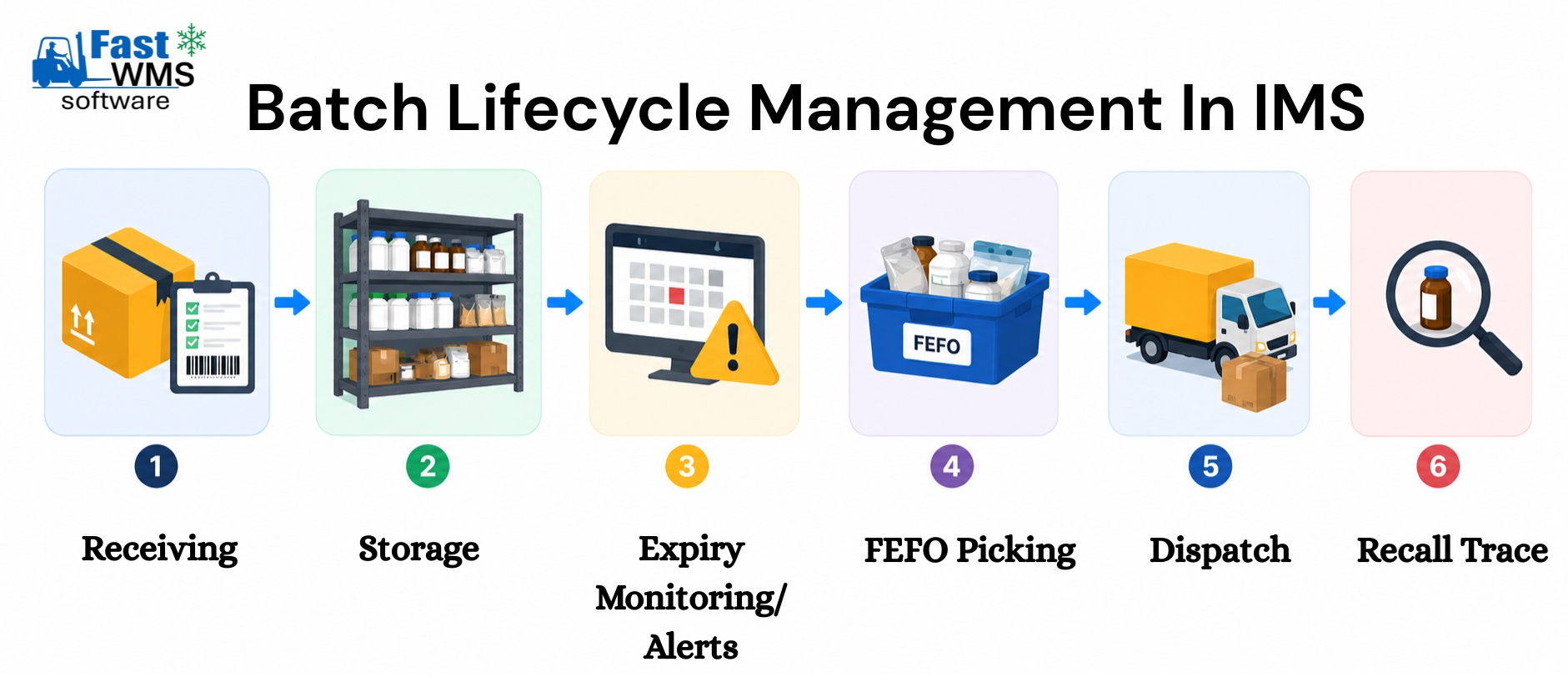
1. Batch Capture at Receiving (GRN)
When stock arrives, the warehouse team scans or enters the batch number and expiry date as part of the Goods Receipt Note (GRN). The IMS stores this against the specific quantity received — not the product as a whole.
2. Automated Expiry Alerts
Businesses set a threshold — say, 30 days before expiry. The IMS continuously scans all batches and flags any crossing that line, surfacing them on a dashboard and sending notifications to relevant staff before stock becomes unsellable.
3. FEFO-Enforced Picking
When an order is placed, the IMS doesn't let staff pick any available unit — it directs them to the batch with the nearest expiry date first. This is enforced through pick lists or barcode-guided picking, removing human judgment from the equation.
4. Quarantine & Hold Management
If a batch fails quality testing or is suspected of an issue, the IMS can place it on "hold" status — instantly blocking it from being picked, sold, or shipped, without physically moving it.
5. Recall Traceability
If a recall is triggered, the IMS can instantly generate a list of every transaction — sales, transfers, returns — involving that batch number. What once took days of manual searching now takes minutes.
6. Expiry-Based Reporting
Reports showing stock value at risk of expiry, average shelf life remaining, and wastage trends help businesses make better purchasing decisions — buying smaller, more frequent quantities for fast-expiring categories.
Batch Tracking in Action: Pharma & Food Use Cases
💊 Retail Pharmacy Chain
Problem: Staff routinely discovered expired medicines during manual shelf checks, after the loss had already occurred.
Solution: IMS-driven expiry alerts at 60/30/15-day thresholds, combined with FEFO-enforced billing at point of sale.
Result: Expiry-related write-offs dropped significantly, and staff shifted from reactive checking to proactive clearance.
🥛 Dairy Distributor
Problem: Mixed-batch deliveries meant some retailers received near-expiry stock while others got fresher stock from the same shipment, causing complaints.
Solution: Batch-level allocation rules in the IMS ensured each retailer route received a balanced, FEFO-compliant mix.
Result: Retailer complaints dropped and return rates fell significantly within two months.
🍞 Bakery & Cloud Kitchen Chain
Problem: No visibility into which raw material batches (flour, dairy, preservative-free items) were nearing expiry, leading to last-minute recipe substitutions or spoilage.
Solution: Batch-linked recipe BOMs in the IMS auto-flagged ingredients nearing expiry, prompting kitchen staff to prioritize recipes using those items first.
Result: Ingredient wastage reduced, and menu planning became proactive instead of reactive.
Common Mistakes in Batch & Expiry Management
- Tracking expiry at the product level, not the batch level: Knowing "this product expires in 6 months" generically is useless if you have five different batches with five different actual expiry dates in stock simultaneously.
- Relying on manual visual checks: Human eyes miss small print, especially under time pressure. Automated alerts catch what manual spot-checks won't.
- No quarantine workflow: Without a formal "hold" status in the IMS, suspect batches can still be picked and shipped by staff unaware of a pending issue.
- Ignoring "Watch" status batches: Focusing only on critical/near-expiry items means watch-list batches quietly slide into critical territory without proactive planning.
- Disconnected batch data across systems: If your POS, warehouse, and accounting systems don't share batch data, FEFO enforcement breaks down at the weakest link.
Batch & Expiry Management Best Practices
Implementation Checklist
Use this checklist when setting up or auditing your batch and expiry tracking process:
Conclusion: Expiry Dates Shouldn't Be a Surprise
For pharma and food businesses, batch and expiry tracking isn't a nice-to-have feature — it's the backbone of regulatory compliance, customer safety, and profitability. Every expired unit on a shelf represents a process failure somewhere upstream, whether in purchasing, alerting, or dispatch logic.
When batch and expiry data lives inside a capable IMS — rather than scattered across paper logs or disconnected spreadsheets — expiry stops being a surprise and becomes a managed, predictable part of operations.
Ready to bring real FEFO discipline and recall-ready traceability to your business? Explore our Fast Inventory Management Solution — purpose-built for pharma, food, and FMCG businesses. Send us an enquiry to see it in action.