What is a Bill of Materials (BOM) and How Does IMS Use It?
A Bill of Materials is the DNA of every product you make. Without it, your inventory system is flying blind — ordering too much, assembling too little, and losing money at every step.

The Hidden Document That Runs Your Production Floor
Imagine you're a manufacturer of electric fans. You receive a bulk order for 500 units. The questions that immediately follow are: How many motor coils do you have? How many plastic blades? How many screws per unit? If you can't answer those questions instantly — your production is already at risk.
The document that answers all of these questions is called a Bill of Materials (BOM). It's one of the most critical pieces of data in manufacturing and inventory management, yet it's one of the least understood outside of production teams.
In this article, we'll break down exactly what a BOM is, the different types you'll encounter, and most importantly — how a modern Inventory Management System (IMS) uses BOM data to automate procurement, prevent production halts, and track costs in real time.
What is a Bill of Materials (BOM)?
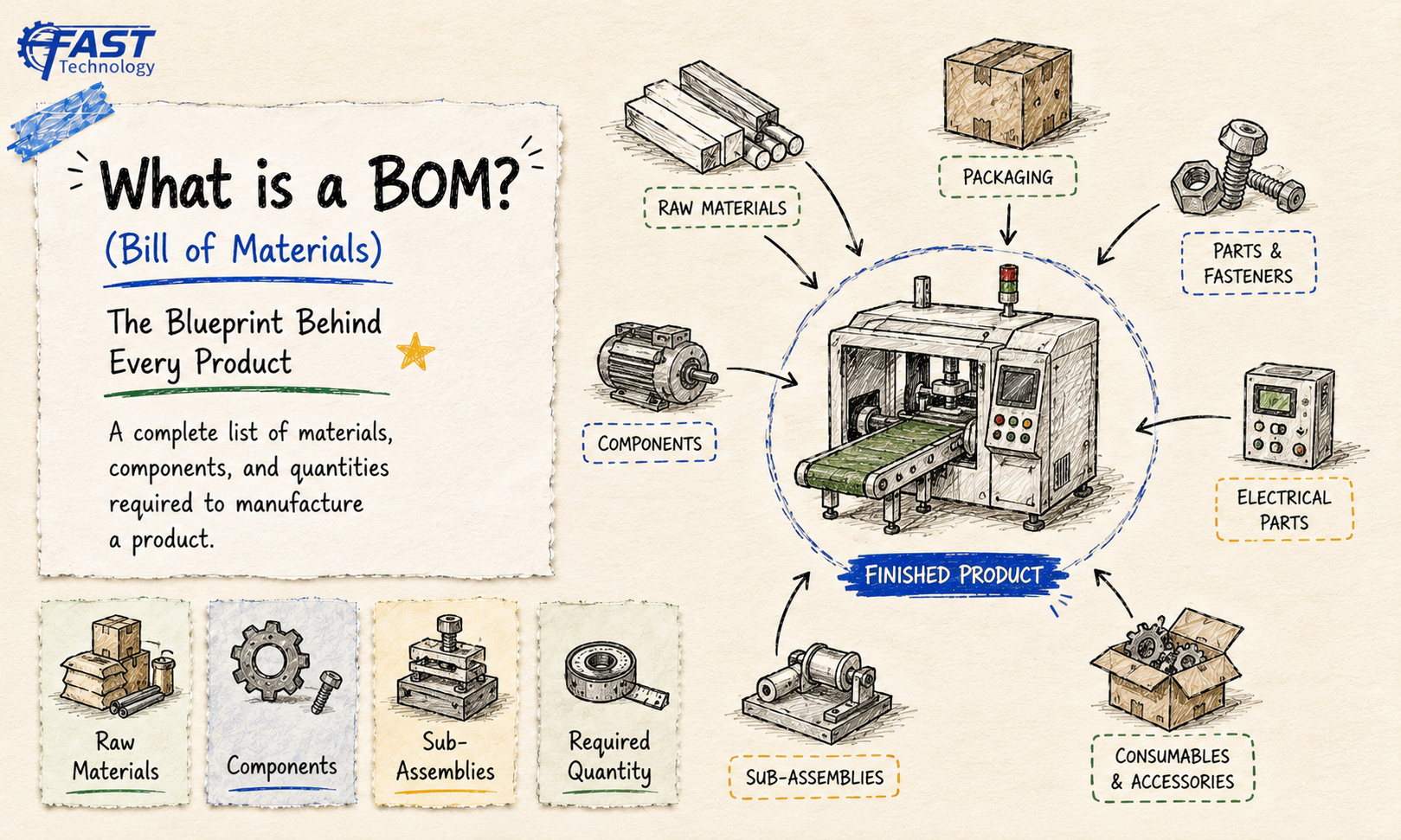
A Bill of Materials (BOM) is a structured, hierarchical list of every raw material, component, sub-assembly, intermediate, and quantity needed to build or manufacture a finished product.
Think of it as a recipe for a product. Just as a biryani recipe tells you exactly how many grams of rice, how many onions, and what spices you need — a BOM tells your factory exactly what materials go into making one unit of your finished good.
Product: Ceiling Fan (1 Unit)
— Motor Assembly × 1
— Fan Blades × 3
— Blade Brackets × 3
— Capacitor × 1
— Downrod × 1
— Mounting Kit (screws, nuts, bolts) × 1 set
— Canopy Cover × 1
— Electrical Wire (1.5m) × 1
Each item in a BOM typically records: the part number or SKU, a description, the quantity per unit, the unit of measurement, the procurement source (bought or made), and sometimes the cost per unit.

Types of Bills of Materials
Not all BOMs are the same. Depending on your industry and the complexity of what you produce, you'll encounter different flavors of BOM:
1. Single-Level BOM
The simplest form. It lists the immediate components of a product without breaking those components down further. Suitable for products with no sub-assemblies — like a packaged gift box or a simple tool kit.
2. Multi-Level BOM
The most common in manufacturing. It shows a complete hierarchy — the finished product breaks into assemblies, each assembly breaks into sub-assemblies, and sub-assemblies break into raw materials. Think of it as a family tree for your product.
3. Engineering BOM (eBOM)
Created by the product design team, this BOM reflects the product as it is designed — often before manufacturing processes are finalized. It's the "ideal" version of the product structure.
4. Manufacturing BOM (mBOM)
The version used on the production floor. It adapts the eBOM to include production-specific details — packaging materials, manufacturing aids, and process-specific sub-assemblies that don't appear in the design document.
5. Sales BOM
Used when a product is sold as a kit or bundle, but the individual components are tracked separately in inventory. For example: a "Fan + Remote + Warranty Card" combo sold as a single SKU, where each part remains a separate stock item.
6. Phantom BOM
A BOM for a sub-assembly that is never stocked as a separate item — it exists only during the production process and is immediately consumed. Common in automotive and electronics manufacturing.

Try It: Interactive BOM Tree Explorer
Select a product below and watch its Bill of Materials "explode" into components and sub-components — exactly how your IMS sees it. Click any component to inspect its live inventory data.
BOM Tree Explorer
Choose a product to expand its Bill of Materials
Component Detail
Expand arrows (▶) to drill into sub-assemblies. Stock data is simulated for illustration.
How an Inventory Management System Uses the BOM
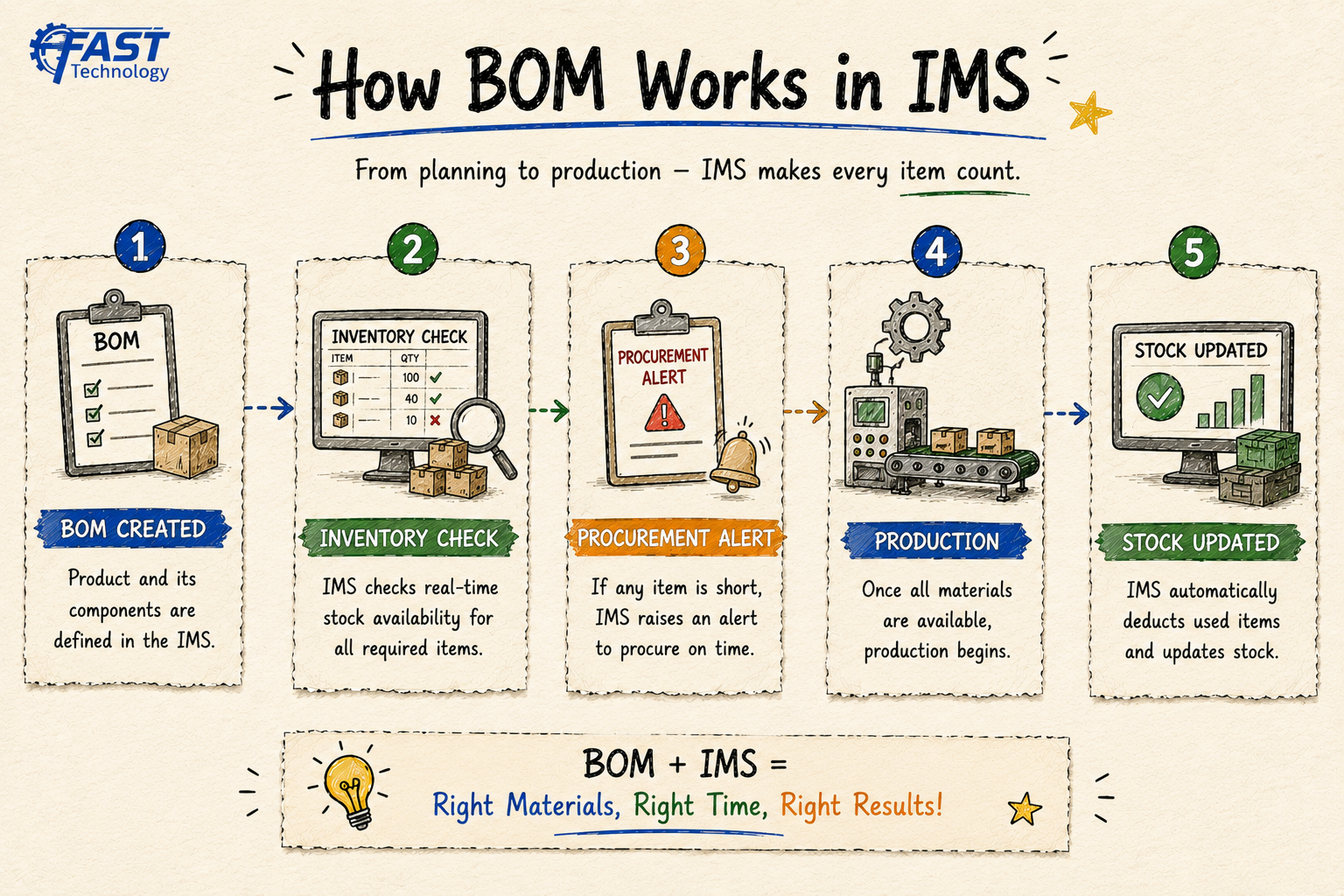
A BOM sitting in a spreadsheet is just a document. A BOM inside an IMS becomes an active engine that drives decisions across procurement, production, costing, and compliance. Here's how:
1. Material Requirements Planning (MRP)
When a sales order comes in for, say, 200 ceiling fans, the IMS reads the BOM and automatically calculates how many of each component is needed. It then checks current stock levels and tells you exactly what to order — and how much of it.
2. Automatic Stock Deduction During Production
Every time a production order is marked complete, the IMS uses the BOM to automatically deduct the consumed quantities from raw material stock. No manual counting, no end-of-day adjustments — the stock always reflects reality.
3. Production Cost Tracking
Because the BOM contains the unit cost of each component, the IMS can calculate the total manufacturing cost of any production order in real time. This feeds directly into pricing decisions, margin analysis, and financial reporting.
4. Low-Stock Alerts at the Component Level
Without a BOM, your IMS only knows you're low on "capacitors." With a BOM, it knows which specific product that capacitor shortage will delay — and by how many units. That's the difference between a vague alert and an actionable one.
5. Batch and Lot Traceability
For industries like pharmaceuticals and food processing, the BOM links every finished batch to the exact raw material lots that went into it. If a raw material is recalled, the IMS can instantly identify every affected production batch.
6. Where-Used Analysis
If a component's specification changes (new supplier, new size), the IMS can run a "where-used" query against all BOMs to find every product affected — preventing unexpected production failures.
Single-Level vs Multi-Level BOM: Which Do You Need?
Choosing the right BOM structure is one of the first decisions to make when setting up your IMS. The wrong choice creates blind spots in your production data.
| Factor | Single-Level BOM | Multi-Level BOM |
|---|---|---|
| Product Complexity | Simple (no sub-assemblies) | Complex (multiple assembly stages) |
| Industries | Retail kits, simple fabrication | Electronics, auto parts, machinery |
| IMS Tracking | Finished goods + direct materials | Raw materials, WIP, sub-assemblies, finished goods |
| Cost Accuracy | Moderate | High |
| MRP Precision | Basic | Very Detailed |
| Setup Effort | Low | Medium to High |
BOM Is Not Just for Factories
Many business owners assume BOM is an exclusively manufacturing concept. It isn't. Any business that assembles, bundles, or packages products uses a BOM — whether they call it that or not.
- 🍽️ Restaurant / Cloud Kitchen: A "recipe card" is a BOM. Each dish has defined ingredient quantities. An IMS with recipe-based BOM can auto-deduct ingredient stock every time a dish is marked as sold.
- 💊 Pharmacy / Nutraceuticals: Each medicine pack is assembled from active ingredients, excipients, and packaging. The BOM ensures correct formulation and lot traceability.
- 🖥️ IT / Electronics Reseller: A "bundled workstation" (PC + Monitor + Keyboard + Mouse) is a Sales BOM. The IMS tracks each item individually but bills them as a set.
- 🎁 D2C / Gift Box Companies: Each gift box SKU has a BOM: product items + tissue paper + ribbon + box. Running out of ribbon can stop your entire packing line — your IMS should catch that.
- 🔧 Service & Maintenance Firms: Maintenance kits have a BOM — filters, oils, gaskets, seals. A BOM-linked IMS ensures technicians always have the right parts before visiting a client site.

Common BOM Mistakes That Wreck Inventory Accuracy
A BOM error is a quiet disaster — it doesn't crash anything immediately, but it compounds over time into stock discrepancies, cost overruns, and production delays. Watch out for these:
- Outdated BOMs after design changes: Your product was redesigned six months ago — but the BOM in the IMS still reflects the old component. Now you're ordering parts you no longer need and not ordering the new ones.
- Incorrect quantities: A BOM says "2 screws per unit" when the actual requirement is 4. For a batch of 1,000 units, that's 2,000 screws short — discovered at 2 AM during a production run.
- Missing sub-assemblies: If your BOM stops at the assembly level without detailing raw materials within each assembly, your MRP calculations will be incomplete and your purchasing will be reactive.
- Not accounting for scrap/yield loss: If 5% of a component is typically lost in production, your BOM should include that buffer. An IMS that plans for 100% yield will consistently run short.
- Multiple versions without version control: Someone updates the BOM in the IMS. Someone else is still working from a printed copy from last quarter. Version-controlled BOMs with effective dates are essential.
BOM Best Practices for IMS Success
BOM Health Checklist
Keep your BOM accurate and your IMS reliable with these practices:
BOM in Action: Real-World Use Cases
🏭 Industrial Equipment Manufacturer
Problem: Production was frequently stalling because sub-components ran out mid-run, with no advance warning.
Solution: Multi-level BOMs in the IMS enabled MRP to calculate component needs 4 weeks ahead. Low-stock alerts were triggered per component, not per finished product.
Result: Zero production stoppages in the following quarter.
☕ Packaged Food Company
Problem: A regulatory recall of one raw material required identifying all affected product batches — a process that took 3 days manually.
Solution: BOM-linked batch traceability in IMS allowed tracing all affected finished goods within 20 minutes.
Result: Faster regulatory response, reduced recall cost, and no secondary contamination risk.
🖥️ Electronics Assembly SME
Problem: Quoted prices were often below actual production cost because manual cost estimates didn't account for all BOM components.
Solution: BOM-driven cost rollup in IMS automatically calculated the total landed cost per unit, including packaging.
Result: Margins improved by 12% in the first two quarters after go-live.
Conclusion: Your BOM is Only as Powerful as Your IMS
A Bill of Materials is not a static document you create once and forget. It's a living dataset that drives purchasing, production, costing, and compliance across your entire business. When it's accurate and embedded in a capable IMS, it becomes one of your most powerful competitive tools.
The question isn't whether you need a BOM — every business that assembles or produces anything already has one, even if it's stuck in a spreadsheet or a notebook. The real question is: is your BOM working for you, or are you working around it?
Ready to bring your BOM into a system that actually uses it? Explore our Fast Inventory Management Solution — built for manufacturers, traders, and service businesses that need BOM-driven intelligence at every step. Send us an enquiry and we'll walk you through it.